
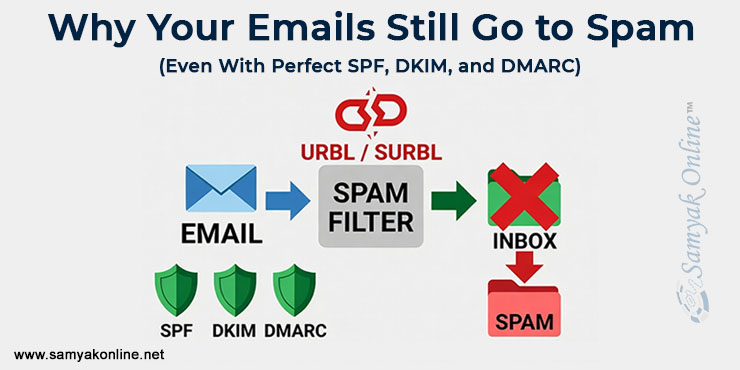
Why Your Emails Still Go to Spam (Even With Perfect SPF, DKIM, and DMARC)
You have done everything right.
SPF, DKIM, and DMARC are all set up perfectly. Your sending IP looks clean. Your email server is stable.
Yet your campaigns, and sometimes even your important transactional emails, keep landing in the spam folder or getting blocked completely.
If you are reading this right now, you are probably in the middle of troubleshooting. You have already checked the usual suspects and you are looking for the one thing that almost nobody thinks about.
That thing is often URBL or SURBL blacklisting of the links inside your emails.
These are not regular server blacklists. They do not care about your IP address or your authentication records. They only look at the actual domains and URLs that appear in your email body, such as your landing pages, call-to-action buttons, tracking links, and any redirect chains.
If any of those domains get flagged, spam filters can treat your entire message as suspicious, no matter how clean the rest of your setup is.
If you’re still working through the foundational setup, this guide covers the core steps: Does Your Email Marketing Not Deliver? Check & Improve Email Deliverability. If authentication is already solid and you’re still stuck, keep reading.
What URBL and SURBL Actually Are (and Why They Matter)
URBL (URI Real-time Block List) and SURBL (Spam URI Real-time Block List) are specialized databases that spam filters use to check the reputation of every link inside an email.
They scan:
- Links in the email body
- Call-to-action URLs
- Tracking domains
- Any redirects or shorteners
If a domain shows up on these lists, your email can be filtered or blocked instantly, even with perfect authentication.
You can check any domain right now using the official SURBL lookup tool.
Why Your Emails Still Fail Even With Correct Authentication
Authentication only proves that you are allowed to send from that domain. It does not prove that the content inside the email is trustworthy.
Once filters clear the technical checks, they move on to content and reputation. That is exactly where URBL and SURBL come into play.
Common triggers include:
- Sending bulk emails without proper consent or good list hygiene
- A compromised or infected website on any linked domain
- Sketchy redirect chains or overused URL shorteners
- Third-party tracking tools that already have a bad reputation
How to Quickly Check If URBL or SURBL Is Hurting Your Deliverability
Stop guessing. Here is exactly what to do right now:
- Open your most recent email, whether it is a campaign or a transactional message.
- List every single domain used in any link.
- Test each one with these free tools:
- MXToolbox Blacklist Check: Quick scan of major blacklists. Start here.
- MultiRBL.valli.org: Checks across 200+ DNS blacklists. More thorough.
- URIBL Lookup: Specifically designed for URI-based blacklists that spam filters use.
Tracking subdomains and redirect services are the most common offenders. Make sure you check everything, not just your main domain.
Step-by-Step Fix: How to Get Delisted and Back in Inboxes
Once you find a flagged domain, follow this straightforward process:
Step 1: Identify the affected URLs
Go through your last few sends and note every flagged domain.
Step 2: Fix the root cause
Remove any harmful content, clean up infected files, replace problematic tracking tools, and pause campaigns that use the bad links.
Step 3: Secure and validate the domain
Make sure the website is clean, loads properly, uses HTTPS, and follows basic email compliance rules.
Step 4: Request removal
SURBL often clears automatically once the bad behavior stops. For URIBL, you can submit a removal request at their admin panel with a short note about the fixes you made.
Step 5: Test and monitor
Run inbox placement tests using tools like GlockApps, Mail-Tester, or your email service provider’s own tool. Then send a small test batch and watch the results over the next 24 to 72 hours.
URBL/SURBL vs. Regular IP Blacklisting
| URBL/SURBL Listing | Traditional IP Blacklist | |
| What it checks | Links and domains inside the email | Your sending server IP |
| What triggers it | Domain or URL reputation | Sending behavior and complaints |
| How it affects you | Content-based filtering | Hard delivery blocks |
| How to fix it | Clean the links and domains | Fix server reputation |
Best Practices to Avoid Getting Listed Again
- Use only your own verified, high-reputation domains for links
- Avoid unnecessary redirects and free URL shorteners whenever possible
- Check your domain reputation every week
- Keep your website secure and free of malware
- Always send to permission-based, well-segmented lists
When You Should Investigate URBL or SURBL Right Away
Look into this immediately if:
- Your emails are still going to spam even though authentication is perfect
- Transactional emails like OTPs, invoices, or receipts are suddenly affected
- Campaign performance dropped suddenly with no other obvious reason
The Bigger Picture
Authentication is table stakes. It gets you in the game, but it doesn’t guarantee inbox placement. Deliverability is a multi-layer problem, and URL reputation is one of those layers that’s easy to overlook because it’s not visible from your server or your DNS records.
If you’ve been troubleshooting for days and can’t find the issue, pull the focus away from your sending infrastructure for a moment and look at what’s inside your emails. That’s often where the answer is.
About Author
Subhash Jain and his team at Samyak Online™ focus on SEO, AI-driven visibility, and technical optimization strategies that help businesses improve performance across search and communication channels. If your emails are still failing despite proper setup, the issue may be linked to hidden factors like URBL or domain reputation. Click here to request a detailed analysis to identify blacklist-related issues and improve email reliability.
FAQs About URBL and SURBL Listings
SURBL is one specific and widely used database for spam-related URLs. URIBL is a similar but separate list. Most spam filters check both. People often use “URBL” as a general term for any blacklist that looks at links inside emails.
Because most tools check your sending server and authentication records, not the domains inside your email content. URL reputation works as a completely separate trust layer. You can pass every standard diagnostic check and still be flagged at the content level. That’s exactly why it stays hidden until you know to look for it.
Can emails still go to spam even with perfect SPF, DKIM, and DMARC?
It typically takes 24 to 72 hours once you fix the root cause. Some lists are clear on their own, while others need a manual request. The quicker you clean things up, the faster you recover.
Yes. Even important messages like password resets, order confirmations, and invoices can get filtered if they contain a flagged link or tracking domain.
Only if the underlying problem is not fixed. Once you clean the domain and change your linking habits, the listing usually stays gone. If you repeat the same mistakes, you risk getting listed again.
Leave a Reply
Want to join the discussion?Feel free to contribute!